
我的博客/计算机 / MySQL
MySQL基础命令(3)——复杂查询
MySQL基础命令-复杂查询
一、子查询
1. 子查询的概念
以下面两张表为例:
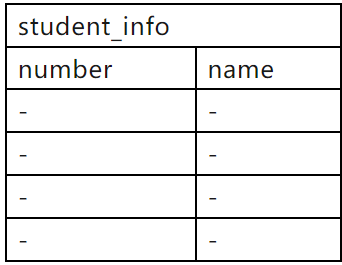
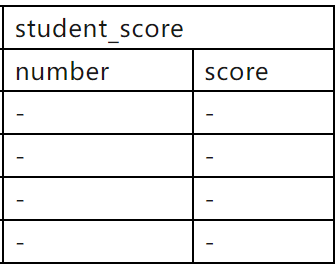
数据处于 student_info 与 student_score 两张表中,通过共同列 "number" 关联。
若已知 name,希望得到该 name 对应的 score,正常需要两个查询语句:
Select number from student_info where name = 'BOB';
Select score from student_score where number = '123456'; -- '123456'为上一步查出来的number
为了书写简便,可以将两条语句合并为一条:
Select * from student_score where number = (select number from student_info where name = 'BOB');
小括号中的内容即为子查询或内层查询(子查询必须使用小括号)。
2. 标量子查询
在上面的例子中,因为查出来的结果(number)是一个值,所以这种子查询也被称为标量子查询,标量子查询的结果可以直接参与运算,例如:
Select * from student_score where number > (select number from student_info where name = 'BOB');
——根据 student_info 表中名为 BOB 的学生的 number 值,筛选出 student_score 表中所有 number 大于这个值的记录。
3. 列子查询
子查询中的结果为一列的子查询为列子查询,例如:
Select * from student_score where number in (select number from student_info where major = 'math');
——从 student_score 表中选择所有 number 在 student_info 表中主修专业为 math 的学生的记录。
4. 行子查询
子查询中的结果为一行的子查询为行子查询,例如:
Select * from student_score where (number, subject) = (select number, 'math' from student_info limit 1);
——从 student_score 表中选择在 student_info 表中主修专业为 math 的学生的 number 和 subject 的第一条记录。
5. 表子查询
子查询中的结果为多行多列的子查询为表子查询,例如:
Select * from student_score where (number, subject) in (select number, 'math' from student_info where major = 'math');
6. 不相关子查询和相关子查询
本章之前的例子均是不相关子查询,即子查询可以独立运行并产生结果,之后再拿结果作为外层查询的条件去执行外层查询。
当子查询的语句引用到外层的列时,子查询就不再能独立运行,这种子查询叫做相关子查询,例如:
Select number, major from student_info where exists (select * from student_score where student_score.number = student_info.number);
——从 student_info 表中选择那些在 student_score 表中存在记录的学生的 number 和 major。
二、连接查询
1. 连接的概念
以 t1、t2 表为例:

两个表连接的本质就是把一个表里的记录和另一个表里的记录两两结合(笛卡尔乘积),将组合后的记录加入最终的结果集中。将 t1、t2 表连接的查询语句为:
Select * from t1, t2;
2. 连接查询过滤条件
由于笛卡尔乘积的结果膨胀速度太快,所以我们在连接时需要进行一定的筛选,筛选的条件可以针对单表,如:t1.m1 > 2、t2.n2 < 'd',也可以针对多表,如:t1.m1 = t2.m2
3. 内连接与外连接
内连接:需要连接的两张表不分先后,只要符合条件就能被筛选出来。一般使用 INNER JOIN 进行连接。

外连接:需要连接的两张表分为"驱动表(外表)"和"被驱动表(内表)",即使驱动表中的记录在被驱动表中没有匹配的记录,也会加入结果集中。
"没有匹配的记录也会加入结果集中"仅限 ON 子句过滤条件,不包含 WHERE 子句,不符合 WHERE 子句条件的均不会被纳入最后的结果集(内连接中 ON 子句与 WHERE 子句等价)。
3.1 左(外)连接和右(外)连接
(1)将 t1, t2 两张表进行左(外)连接:
select * from t1 left [outer] join t2 on 过滤条件 [where 过滤条件];
此时,t1 表为驱动表(外表),t2 表为被驱动表(内表)

(2)将 t1, t2 两张表进行右(外)连接:
select * from t1 right [outer] join t2 on 过滤条件 [where 过滤条件];
此时,t2 表为驱动表(外表),t1 表为被驱动表(内表)

4. 其他
(1)多表连接
Select * from t1 inner join t2 on t1.m1 = t2.m2 inner join t3 on t1.m1 = t3.m3;
(2)表的别名
在表名过长时,可以定义表的别名使语句更加清晰,例如:
Select s1.number, s1.major from student_info as s1 inner join student_score as s2 where s1.number = s2.number;
三、并集查询
1. 涉及单表的查询
Select m1 from t1 where m1 < 2;
Select m1 from t1 where m1 > 2;
若希望将以上两个查询语句的结果合并到一个大的结果集中,可以使用 OR 运算符进行连接:
select m1 from t1 where m1 < 2 or m1 > 2;
也可以使用 UNION 进行连接:
Select m1 from t1 where m1 < 2 union select m1 from t1 where m1 > 2;
此外,只要表达式数量相同,查询语句中可以包含多个表达式:
Select m1, n1 from t1 where m1 < 2 union select m1, n1 from t1 where m1 > 2;
2. 涉及不同表的查询
实际上,并集查询主要应用于不同表的查询,例如:
Select m1, n1 from t1 where m1 < 2 union select m2, n2 from t2 where m2 > 2;
3. 包含或去除重复的行
对于表 t1 的 m1、n1 列和表 t2 的 m2、n2 列:

如果直接通过 UNION 进行连接,SQL 会默认进行去重:

如果希望保留重复的记录,可以使用 UNION ALL 来连接多个查询:
